LeafYX · Configuration
Instruments, licence and archive, according to the laboratory.
LeafYX controls the acquisition system, is activated by modules with a hardware key and keeps cases in a local or network database. This page summarises what is configured and where.
- 01Hardware keyModular licence
- 02Motorised microscopeModule · Microscope control
- 03Motorised stageModule · Metaphase Finder
- 04FocusAutofocus
- 05Filter wheelModule · Filter wheel control
- 06CameraModule · Acquisition
- 07LED illuminationFluorescence, configurable wavelengths
- 08Oil dispenserModule · Oil dispenser
01 Supported instruments
Drive your laboratory’s acquisition system.
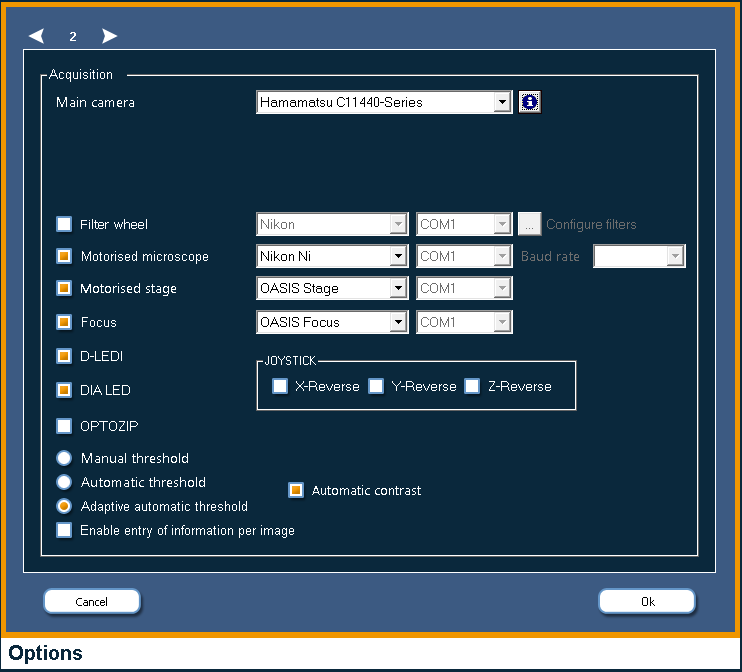
LeafYX controls the microscope, stage, focus, filter wheel and camera. The devices are chosen and connected from the program options.
Instrument categories
Categories- 01Motorised microscopesControl of objectives, nosepiece and illumination.
- 02Motorised stages and joystickFor slide scanning and repositioning on the metaphases.
- 03Motorised focusFor autofocus and metaphase finding.
- 04Motorised filter wheelsFor acquisition per fluorochrome.
- 05Digital scientific camerasSelectable in the program options.
- 06LED illuminationFor fluorescence, at configurable wavelengths.
- 07Automatic oil dispenserFor the immersion objective.
- 08Configurable serial connectionsCOM port and baud rate for wheel, microscope, stage and focus.
Compatibility
CheckCompatibility with individual models is checked against your laboratory’s configuration.
- Tell us which microscope, stage, focus, filter wheel and camera are installed.
- Together we check which LeafYX functions can be used on your configuration.
- The control modules (microscope, filter wheel, Metaphase Finder, oil dispenser) are enabled accordingly.
The check is made case by case, on the instruments actually installed.
02 Modular licence
One hardware key, the modules you need.
LeafYX is activated with a hardware key. The archive is always included; the other modules are enabled according to the needs of the laboratory.
| Module | What it enables | Status |
|---|---|---|
| Archive | The program itself and the case archive | Included |
| Acquisition | Live image, normal and high resolution | Module |
| Karyotype | Manual and automatic karyotyping | Module |
| FISH | FISH environment | Module |
| Filter wheel control | Motorised filter wheel | Module |
| Microscope control | Motorised microscope | Module |
| Metaphase Finder | Scanning and automatic metaphase finding | Module |
| Oil dispenser | Automatic oil for the immersion objective | Module |
The modules to enable are defined together with the laboratory, according to its instruments and workflow.
- Modules8 · the archive is included, the other seven are enabled with the key
- Languages4 · Italian, English, French, German; others on request
- Barcodes4 · Code128, Code39, Codebar, Interleaved 2 of 5
- Import4 formats · TIFF, JPEG, BMP, TGA
03 Archive installation
On the workstation or on the network, with several archives.
Cases are stored in a Microsoft SQL Server Express database. Where to install it, where to keep the images and how to exchange material is decided in the options.
Database
Local or network- On the workstationMicrosoft SQL Server Express database.
- On a shared serverOn the network between several workstations: server location in the options.
- Several archivesOn the same workstation: create a new archive or load an existing one.
Images
Drives- Also on another driveThe image folders can be on a different disk from the database.
- Service configurationWe set it up with the laboratory.
Archiving
Removable- Removable drivesArchiving of cases and restore.
- Archived cases remain availableThey stay visible as remote cases.
- CompressionOf archived cases, to take up less space.
Exchange
.cell files- Export and importOf cases, single slides and single images, to exchange material between workstations.
- Rename and deleteOf case, slides and images; deletion asks for confirmation and is recorded in the log.
Case record and barcodes
- Configurable case recordDefined with a template; import, export and print from the File menu.
- Format and displayThe barcode format and its display are chosen in the options.
- AssociationThe Metaphase Finder associates the digits of the barcode with case, slide and scan profile.
- Database
- Microsoft SQL Server Express
- Location
- Workstation or shared network server
- Structure
- Case → slides → images
- Exchange
- Cases, slides and images (.cell)
- Barcodes
- Code128, Code39, Codebar, Interleaved 2 of 5
04 Users and security
Distinct permissions. Every operation logged: who, what, when.
The audit log is a text file per day and per workstation: one line per event, with date, time, user, case and action.
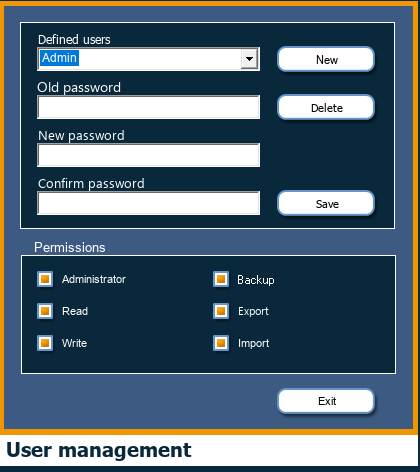
- Users with distinct permissions: read, write, administration, backup, export and import; user management from the File menu and sign-in at start-up.
- Locking of the open case: in multi-user work, a case in use at one workstation is locked for the others.
- Protected folder: operators can only add lines; reading and deleting is reserved to the administrator.
- The log is always written on the workstation, even when the case is on the network or on a removable drive.
05 Interface and customisation
The interface adapts to those who use it.
The options are organised in pages. The interface language follows that of the operating system; shortcuts and macros speed up repetitive work.
- Interface in Italian, English, French and German, chosen automatically from the language of the operating system. Other languages can be added on request.
- Customisable keyboard commands: every button can have its own shortcut.
- Macros to record and replay the most frequent command sequences.
- Window layout that can be saved per user, with restoring of the original.
- Languages
- Italian, English, French, German; others on request
- Language selection
- Automatic, from the language of the operating system
- Shortcuts
- Customisable, one per button
- Macros
- Recording and replaying of command sequences
Options pages
06 Frequently asked questions
Questions about configuration.
01Does LeafYX work with our instruments?
LeafYX controls motorised microscopes, motorised stages and focus, filter wheels, digital scientific cameras, LED illumination and an oil dispenser, with configurable serial connections. Compatibility with individual models is checked against your laboratory’s configuration: tell us which instruments are installed.
02Can the database be on a network server?
Yes. The Microsoft SQL Server Express database can be on the workstation or on a server shared across the network between several workstations. The server location is set in the options.
03How are the modules activated?
With a hardware key. The archive is always included; acquisition, karyotype, FISH, filter wheel control, microscope control, Metaphase Finder and oil dispenser are enabled according to the needs of the laboratory.
04Which languages is the interface in?
Italian, English, French and German: the program opens in the language of the operating system. Other languages can be added on request.
07 Continue
Learn more.
For Research Use Only.
LeafYX is software for cytogenetics research. For Research Use Only (RUO): not a medical device and not for use in diagnostic procedures.
The automatic functions produce suggestions: separation, classification, karyotype and count remain under the operator’s verification.
Demo
Check LeafYX on your own configuration.
Contact us for a demonstration, to check the installed instruments or to define the modules best suited to your laboratory.